

Approvals, steering, and run controls
Approve or reject what the agent proposes, guide it mid-run, and pause, stop, or skip.
The assistant drafts and proposes. You decide what to approve. This page covers the approval cards, steering the agent between steps, and the run controls. For the run page layout and timeline, see Run a playbook.
Approval gates
A run reaches a gate that you set on an action (see Build a playbook). Its status becomes Waiting for approval. An approval card appears inline above the timeline, badged Approval needed. There are two kinds.
Before action (pre-approval)
Labelled Before action. Shown before the agent dispatches the action. The card contains:
- the agent’s rationale for the step it proposes;
- Documents to include — checkboxes. Clear the files the agent must not use;
- Proposed parameters — the action’s payload. You can edit it.
Choose Approve to let the action run. Choose Reject to send it back.
Output review (post-approval)
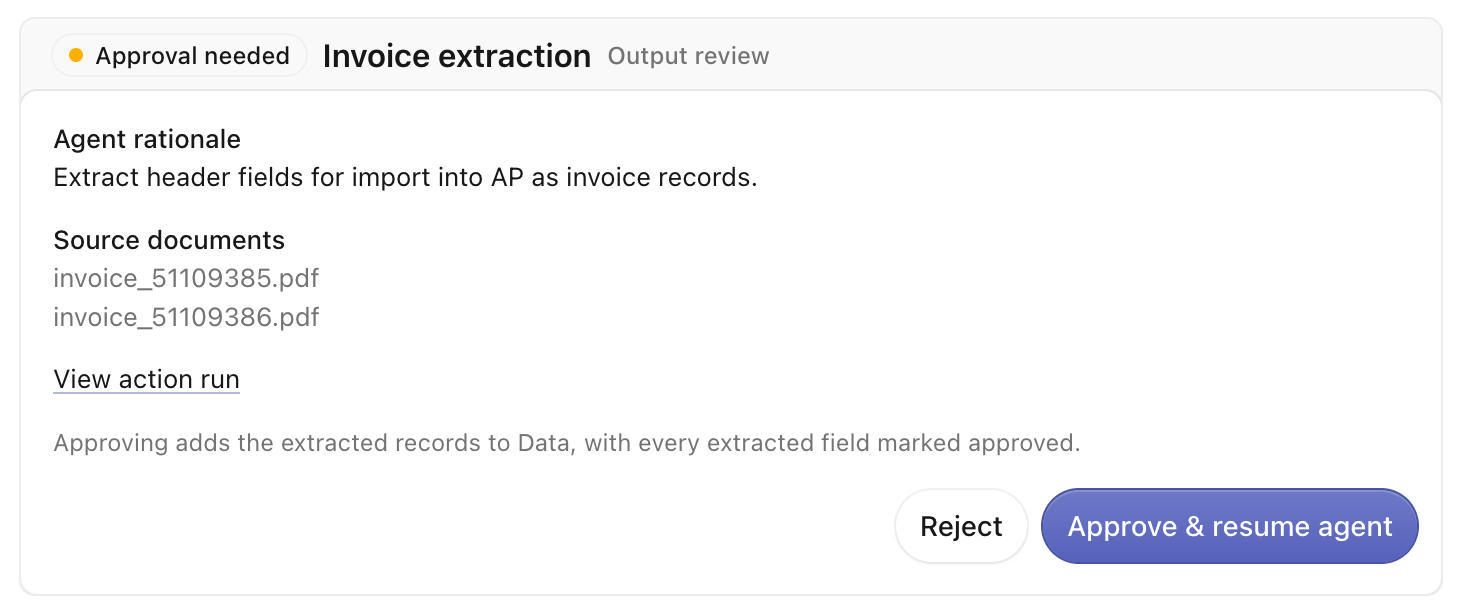
Labelled Output review. Shown after the action produces a result, so you can check the result before it commits. The card lists the source documents and any artifacts.
An embeddable artifact opens a fullscreen review surface, for example an extraction table. Inspect or edit the result there before you approve. Saving changes there saves only your table edits. The agent resumes when you approve. The approve button reads Approve & resume agent.
Approving an extraction output “adds the extracted records to Data, with every extracted field marked approved.” The records land in the space Data tab.
Rejecting
To reject, add a note and confirm. The prompt reads “Add a note so the agent can adjust.” The agent uses your note to retry or adjust its approach.
Who approves: anyone with enough access to the space who looks at the run. An approval is a single decision on the card. It is not a request routed to a named person. Contributing to a space grants the ability to decide. See Members and roles.
Steering the agent
The steering composer sits at the bottom of a live run: “Add guidance for the next agent step.” Type your guidance and click Steer. The guidance applies between the agent’s steps. Helper text reads “Guidance applies between agent steps.” Your message appears in the timeline as your event. When the run finishes, the composer is disabled (“This run has finished and no longer accepts guidance.”).
Run controls
For a live run, the controls sit in the header.
- Pause / Resume — pause the agent and pick it back up. A paused run shows Resume.
- Stop — opens a confirm dialog (“Stop this run?” — “The agent will stop after the current operation. A downstream action may continue running.”). Confirming marks the run cancelled.
- More run controls (the ⋯ menu) — Skip current action when the run is Waiting for approval, or Skip running actions when it is Waiting for action. Skipping cancels the in-flight action(s) so the run can move on.
